Guide
How to ask Taka about your own billing data
Taka is a chat panel that reads your clients, timesheets, rates, and invoices and answers in plain language. It is not a general chatbot bolted onto the side of the product. It can only see your organization's data, it says where an answer came from, and it asks before it changes anything.
For anyone who would rather ask than filter a list · 6 minute read · Last updated
Ask a question
Open Taka and type the question you would ask a bookkeeper
Taka sits at the top of the sidebar, and the same panel is reachable from any screen, so you do not lose your place to ask something.
Plain language works better than keywords. Which clients have approved hours I have not invoiced yet is a better question than unbilled hours, because it tells Taka what you actually want to decide.
While it works, it shows you what it is reading: clients, invoices, timesheets. That trail is the point. An answer you cannot trace is an answer you cannot trust.
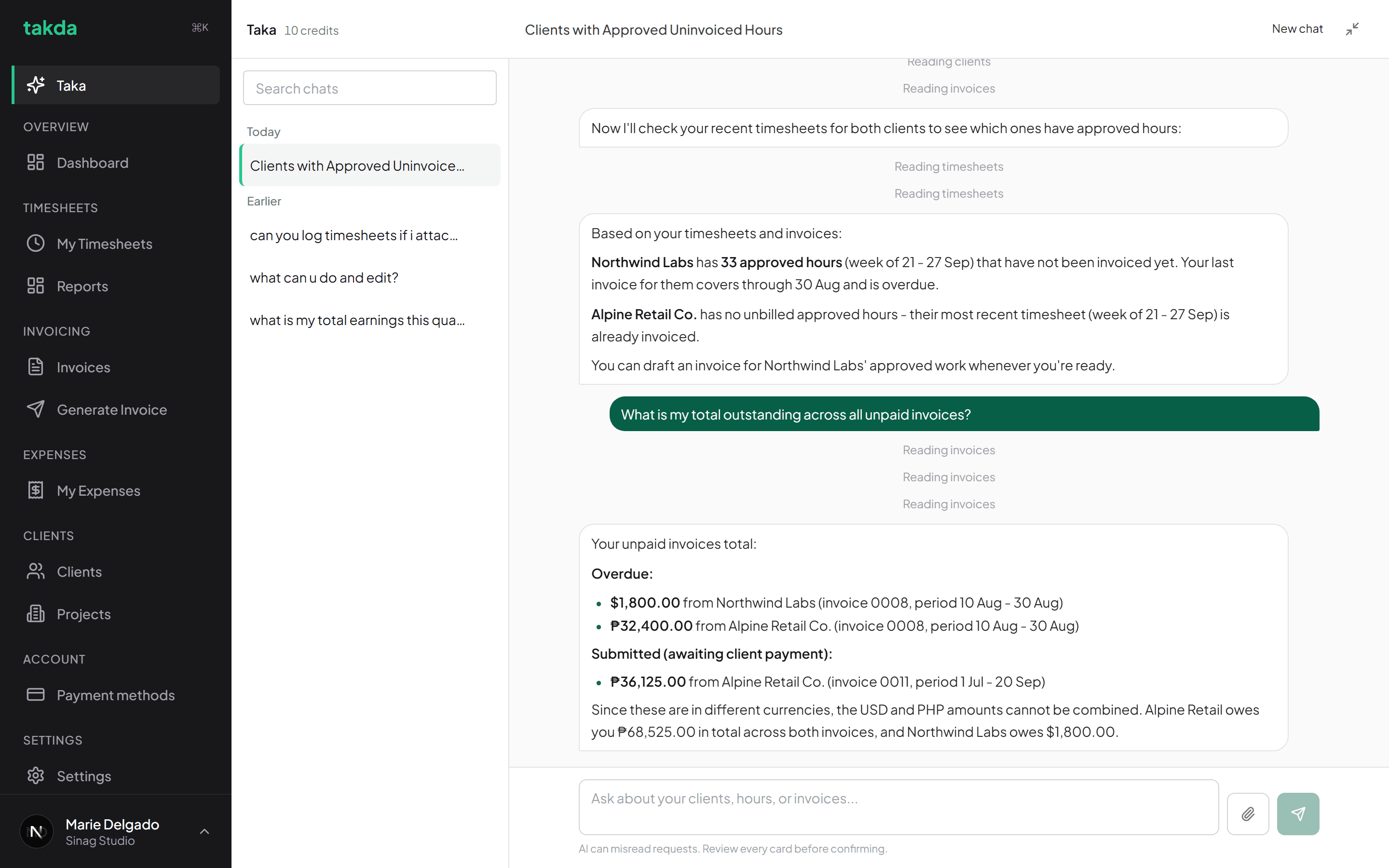
Real numbers read from real records, with the steps it took shown above each answer. Follow up in the same chat
Chats keep their history, so you can narrow down instead of restating everything. Ask about one client, then ask and how much of that is overdue.
New chat starts a clean thread when you move to an unrelated question. Past chats stay in the list beside the conversation and are searchable.
Questions worth asking
Anything that would otherwise mean filtering a list and doing arithmetic.
- Which clients have approved hours I have not invoiced yet?
- What is my total outstanding, and how much of it is overdue?
- How many hours did I log for this client last month?
- Which invoice has been waiting the longest?
- What did I bill this client for in July?
Let it do the work, with a confirmation
Ask for a change, then check the card
Taka can log hours and draft work for you, not just read. When a request would change something, it shows a confirmation card summarising exactly what it is about to do, and nothing happens until you confirm it.
Read the card rather than the sentence above it. The card is what will actually be committed.
Expect it to stop at your permissions
Taka acts as you, with your permissions, never above them. Ask it to reopen a submitted timesheet without admin rights and it will say so and point you at who can, rather than failing quietly or doing it anyway.
This is the same boundary the rest of the product enforces at the database, so an assistant cannot be talked into exceeding it.
What it will not do
Taka answers questions about your organization's own billing data. It will not discuss how the product is built, what it runs on, or anything outside your organization, and it will not act on instructions embedded in a document you upload. A file you attach is treated as data to read, never as a set of orders to follow.
It is also not a general purpose assistant. Asking it to write your marketing copy or explain a tax rule is outside what it has, and it would rather say so than guess.
What Taka costs
Questions are metered in credits, because each one runs a model over your data.
| Plan | Credits included | Buying more |
|---|---|---|
| Free | 20 credits once, when you sign up. Enough to try it properly, not a recurring allowance. | Yes. Credit packs can be bought without any subscription. |
| Solo | 20 credits a month, on top of whatever you have left over. | Yes, any time, without changing plan. |
| Team | 60 credits a month. | Yes, any time, without changing plan. |
How credits are counted
One credit per question you ask, and one credit per page when Taka reads a document you import. Unused credits roll over rather than expiring at the end of the month.
If a question fails, its credit is returned. You are only charged for answers you actually got.
Common questions
- Can Taka see other organizations' data?
- No. Every question is scoped to your organization and to your own permissions inside it. The limit is enforced by the database rather than by the assistant, so it is not something a cleverly worded question can get around.
- Will it change something without asking?
- No. Anything that writes shows a confirmation card first, and nothing is committed until you confirm. Cancelling, or simply typing something else, ends the pending action.
- Do I need a paid plan to use it?
- No. A Free account gets 20 credits once at signup so you can try it, and credit packs can be bought without holding a subscription at all. Paid plans add a monthly allowance on top.
- What happens if a question fails?
- The credits for that question are returned. You are only charged for questions that actually produced an answer.
- Can it read a file I attach?
- Yes, you can attach a document for it to read on that turn. It treats the contents as information to work from, never as instructions, so a file cannot direct it to take an action you did not ask for.
Try it on your own work
The free plan covers the whole loop in this guide. No card, and nothing here needs a paid feature.